

Getting started at an online casino should feel seamless, not stressful. At Cocoa Casino, we have designed our login process to be as smooth and secure as possible, giving you instant access to hundreds of games without unnecessary hurdles. Whether you are signing in from a desktop browser, a mobile phone, or a tablet, the experience is consistent and reliable.
We understand that UK players value both convenience and security in equal measure. Our platform is fully licensed and regulated, meaning every step of the authentication process adheres to strict standards set by the UK Gambling Commission. From the moment you enter your credentials to the moment your lobby loads, your data is protected by industry-leading encryption protocols.
This guide walks you through everything you need to know about logging in to your Cocoa Casino account — including step-by-step instructions, troubleshooting tips, security advice, and answers to the most frequently asked questions. If you are new here or returning after a break, this page has you covered from start to finish.
How to Access Your Account in Minutes
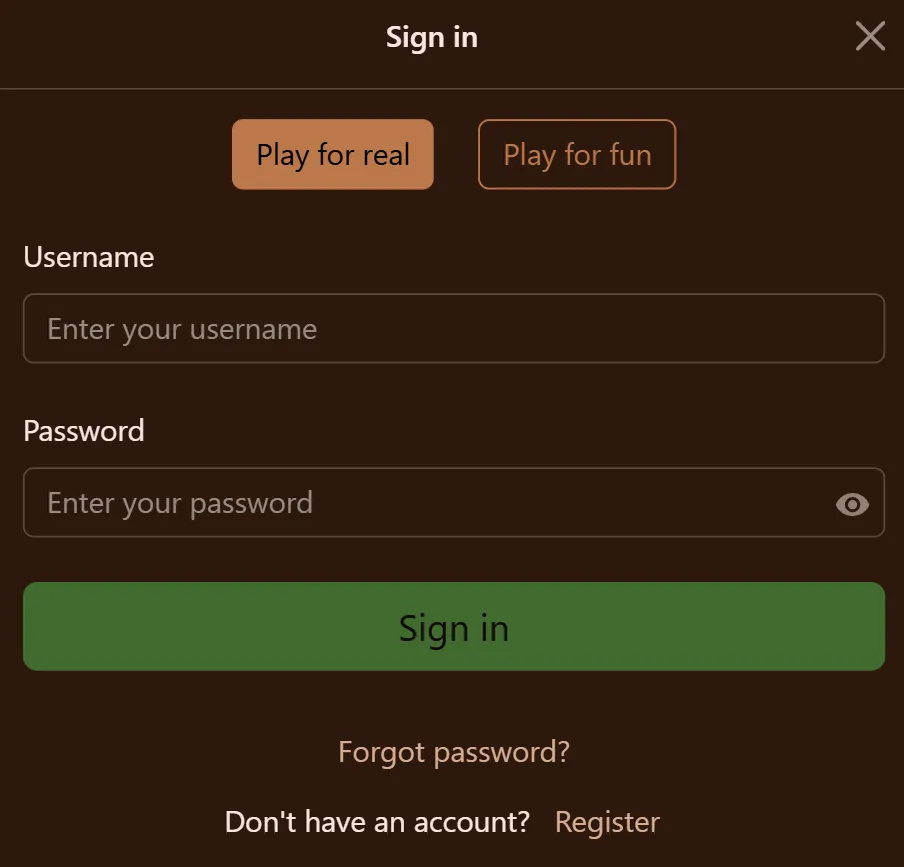
Logging in to Cocoa Casino is a quick process that takes under a minute when you know the steps. We have deliberately kept the interface clean and uncluttered so that you are never more than two clicks away from your favourite slots or live dealer tables. The login form is accessible directly from the homepage, positioned prominently in the top navigation bar.
Before you begin, make sure you have your registered email address and password to hand. If you originally signed up with a social account or third-party verification, use those same credentials. Our system will recognise your account regardless of the device you are using, so there is no need to create separate logins for mobile and desktop.
Follow these steps to sign in successfully every time:
- Navigate to the Cocoa Casino homepage.
- Click the Login button located in the upper-right corner of the screen.
- Enter the email address you used when registering your account.
- Type your password into the designated field — passwords are case-sensitive, so double-check capitals and special characters.
- If you are on a private device, tick the “Remember Me” box to save your email for next time.
- Click the Sign In button to proceed.
- Complete any two-factor authentication step if you have enabled 2FA on your account.
- You will be redirected to your personalised dashboard where your balance and promotions are displayed.
If you experience any issue during this process, do not panic. Our support team is available around the clock via live chat to assist. Most login problems are resolved within minutes and are often caused by simple issues such as a mistyped password or an outdated browser cache.
What Happens If You Cannot Sign In
Occasionally players find themselves locked out of their accounts, and this is more common than you might think. We have built a straightforward account recovery flow to get you back inside your account as quickly as possible. The most important thing is not to attempt multiple failed logins in succession, as this can trigger a temporary security lock on the account.
There are a handful of common reasons why a login attempt might fail. Understanding which one applies to you makes the fix much faster. Below is a breakdown of the most frequent causes and what you should do about each one:
- Forgotten password — Click “Forgot Password” beneath the login form and enter your registered email. You will receive a reset link within a few minutes. Check your spam folder if it does not arrive promptly.
- Incorrect email address — Some players register with a work email and later try to log in with their personal one. Try alternative addresses you may have used at registration.
- Account temporarily suspended — If you have requested a self-exclusion period or our responsible gambling tools have flagged unusual activity, your account may be on hold. Contact support directly.
- Browser compatibility issues — Older browser versions can interfere with our login scripts. Updating your browser or switching to Chrome, Firefox, or Safari usually resolves this.
- Caps Lock enabled — This is surprisingly common and easy to miss. Check that your caps lock key is not accidentally engaged.
- VPN interference — Some VPN services can trigger our geo-location checks and prevent access for players based in the UK. Disable your VPN and try again.
If none of the above resolves your issue, reach out to our support team who can verify your identity manually and restore access to your account. We take account security seriously and may ask you to provide identity verification documents as part of this process — this is standard practice across regulated UK casinos.
Security Features Protecting Your Login
At Cocoa Casino, security is not an afterthought — it is woven into every layer of our platform. We employ a multi-tiered security framework that protects your account from unauthorised access, phishing attempts, and data breaches. Understanding these protections gives you peace of mind every time you sign in.
Our platform uses 256-bit SSL encryption, which is the same standard used by major banks and financial institutions. This ensures that the data transmitted between your browser and our servers cannot be intercepted by third parties. Additionally, we perform regular security audits and penetration testing to identify and address vulnerabilities before they can be exploited.
Here is an overview of the key security measures we have in place:
- Two-Factor Authentication (2FA) — Optional but highly recommended. When enabled, you will be asked to enter a one-time code from your authenticator app after entering your password.
- Login activity monitoring — We track IP addresses and device fingerprints. If a login attempt comes from an unrecognised location, you will receive an email alert.
- Automatic session timeout — Idle sessions are logged out automatically after a set period to prevent unauthorised use on shared devices.
- Rate limiting on failed attempts — After a set number of incorrect login attempts, the account is temporarily locked and you will be prompted to reset your password.
- Encrypted password storage — We never store your password in plain text. All credentials are hashed using industry-standard algorithms.
We strongly encourage all players to enable two-factor authentication and to use a unique, complex password for their Cocoa Casino account. Avoid reusing passwords from other websites, and consider using a reputable password manager to keep track of your credentials securely.
Mobile Login Experience at Cocoa Casino
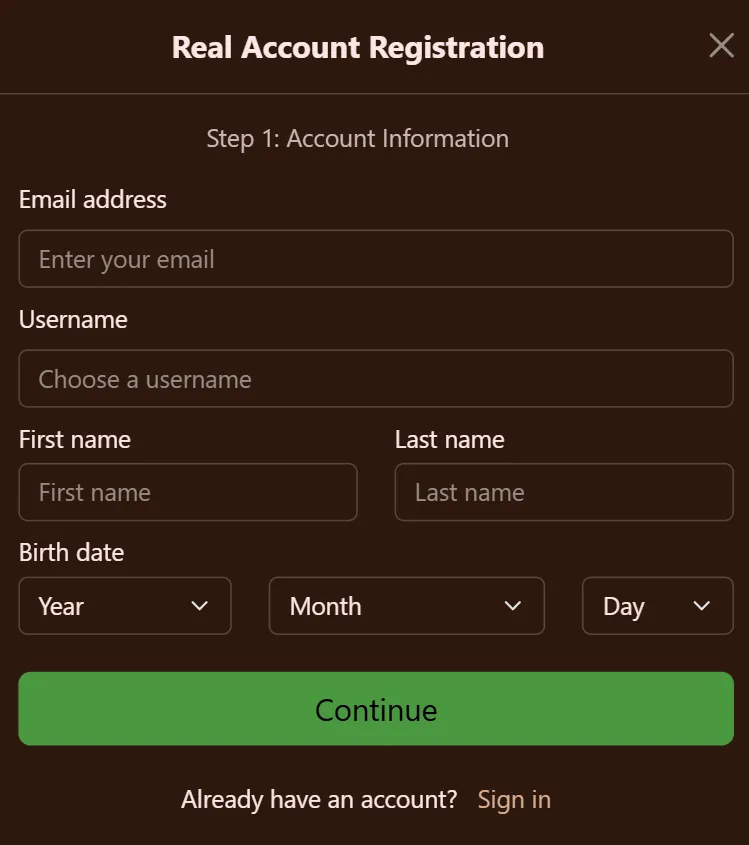
More and more of our members now sign in exclusively from smartphones and tablets, so we have engineered the mobile login flow to feel just as refined as the full desktop version — never a stripped-back afterthought. The entire platform is built on a fully responsive framework, which means the login screen reshapes itself instantly to fit any display, from a compact phone to a widescreen tablet. There is no forced download to access your account through a browser, yet players who want the extra convenience of a native experience can grab our dedicated app for both iOS and Android. And if you are reading this before you have an account of your own, you can create a Cocoa Casino account in under a minute and be ready to log in from your phone straight away.
On mobile, signing in becomes remarkably effortless thanks to biometric authentication support. Where your device offers fingerprint scanning or Face ID, you can switch these methods on from your account settings and unlock access with a single tap or glance. That means no more fumbling with passwords on a cramped touchscreen keyboard — your login is verified in the time it takes to look at your screen, while remaining every bit as secure as a typed credential.
If you opt for the native app, you will notice that Cocoa Casino keeps your session securely stored on the device, so you are rarely prompted to re-enter your details unless you deliberately sign out or move to a different phone or tablet. On top of that, the app delivers real-time push notifications the moment you log in, flagging time-limited promotions and exclusive rewards so you never miss a deal reserved for our mobile players.
Comparing Login Methods Available to UK Players
We offer several ways to authenticate yourself when accessing your account. Each method has different advantages depending on your preferences, device type, and how often you play. The table below provides a clear comparison to help you choose the approach that works best for you.
| Login Method | Speed | Security Level | Best For | Available On |
|---|---|---|---|---|
| Email & Password | Fast | Medium | Desktop users, first-time logins | All devices |
| Email + 2FA Code | Moderate | Very High | Security-conscious players | All devices |
| Biometric (Fingerprint / Face ID) | Very Fast | High | Mobile app users | iOS & Android App |
| Remembered Session (Cookie) | Instant | Medium | Regular players on personal devices | Desktop & Mobile Browser |
| Manual Password Reset Flow | Slow | High | Account recovery situations | All devices |
As the table illustrates, biometric login offers the best balance of speed and security for mobile players. For desktop users who are conscious about protecting their accounts, enabling two-factor authentication alongside the standard email and password method is the recommended combination.
UK Player Login Statistics and Behaviour Trends
Understanding how players interact with online casino login pages helps us continuously improve the experience. Based on aggregated and anonymised data from UK online gambling platforms published by the UK Gambling Commission and industry research bodies, we can share some interesting insights about player login behaviour.
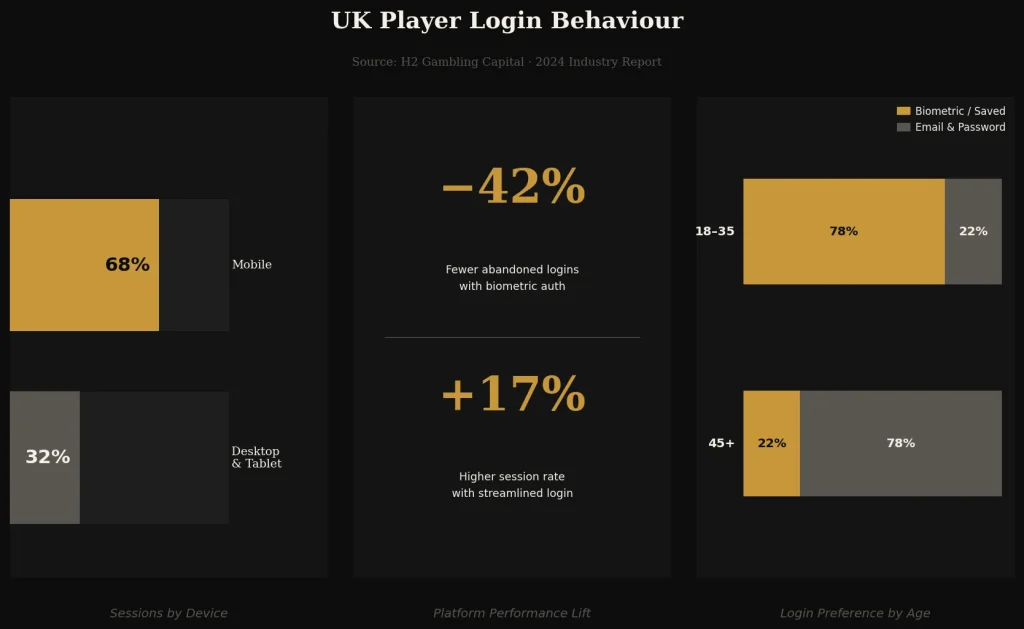
Research Insight: According to a 2024 industry report by H2 Gambling Capital, approximately 68% of UK online casino sessions are initiated via mobile devices. Of those mobile logins, platforms that offer biometric authentication report 42% fewer abandoned login attempts compared to those relying solely on typed credentials. Furthermore, casinos with streamlined login flows — defined as fewer than three steps to access the lobby — see an average 17% higher session initiation rate among returning players.
These statistics reflect exactly why we have invested so heavily in optimising our login experience. Fewer friction points at the authentication stage translate directly into more time spent playing and less frustration for our members. We monitor our own platform metrics continuously and use them to drive decisions about interface improvements.
The data also highlights a clear generational divide: players aged 18–35 overwhelmingly prefer biometric or saved session logins, while players aged 45 and above tend to use the traditional email and password method. We cater to both preferences without forcing anyone to adopt a method that does not suit them.
Advantages and Drawbacks of the Current Login System
No system is perfect, and we believe in being transparent with our players about both the strengths and limitations of our current login infrastructure. This helps set realistic expectations and ensures you know exactly what to anticipate when accessing your account.
Let us start with what we do well. The login flow at Cocoa Casino has been refined based on player feedback over several years, and we are proud of the results. However, there are also areas where we are actively working on improvements.
Advantages of our login system:
- Simple, clutter-free interface that does not overwhelm new players
- Full support for biometric authentication on mobile devices
- Robust two-factor authentication options for enhanced security
- Cross-device session continuity — start on desktop, continue on mobile
- UKGC-compliant identity verification integrated into the login flow
- Fast account recovery via automated email reset links
- 24/7 support available if automated recovery is insufficient
Current limitations and areas of improvement:
- Social login (Google, Apple ID) is not yet supported but is on our development roadmap
- The 2FA setup process requires a few additional steps that some players find slightly involved
- Session timeout intervals cannot currently be customised by the player
- Password reset emails can occasionally be delayed by up to 10 minutes during peak traffic periods
We value every piece of feedback we receive about the login experience. If you have a suggestion or have encountered a specific issue, our support team logs all feedback and passes it directly to the product development team. Several of the improvements listed above are the direct result of player suggestions submitted through our feedback portal.
Keeping Your Account Safe After Login
Logging in successfully is only the first step in maintaining a secure gambling experience. Once you are inside your account, there are several habits and settings we recommend to keep everything protected. These are especially important if you share a device with family members or access Cocoa Casino from public Wi-Fi networks.
Always sign out manually when you are finished playing, rather than simply closing the browser tab. This ensures your session is properly terminated on our servers, not just on your device. On mobile, the app’s logout button is accessible from the account menu at the top of the screen.
We also recommend reviewing your account’s login history periodically. This feature, available under your account settings, shows the timestamp and approximate location of every recent login. If you notice any activity you do not recognise, change your password immediately and contact our support team. Acting swiftly in such situations is critical to preventing unauthorised access to your funds.
Frequently Asked Questions About Cocoa Casino Login
What should I do if my Cocoa Casino login page is not loading correctly?
If the login page is not loading or appears broken, start by clearing your browser cache and cookies, then reload the page. This resolves the majority of display issues caused by outdated cached data. If the problem persists, try accessing the site in a private or incognito browsing window. You should also check whether your browser is up to date — we recommend Chrome, Firefox, or Safari for the best experience. If none of these steps help, it is possible there may be a temporary technical issue on our end; check our social media channels or contact our support team for a status update.
How long does it take to receive a password reset email?
In most cases, the password reset email arrives within two to three minutes of submitting the request. If it has not appeared in your inbox after five minutes, please check your spam or junk mail folder, as automated emails can sometimes be filtered incorrectly. If you still cannot find it after ten minutes, there may be an issue with the email address on file — in that case, contact our support team via live chat and they can verify your identity and assist with account recovery through an alternative method.
Is it safe to use the “Remember Me” feature on the login page?
The “Remember Me” feature stores a secure, encrypted token on your device that allows you to skip re-entering your email address on future visits. It does not store your password. This feature is safe to use on personal devices that only you have access to. We strongly advise against using it on shared computers, work machines, or any device that other people can access. If you accidentally enable it on a shared device, you can clear the saved session by logging out manually or clearing the browser’s cookies for our site.
Can I log in to Cocoa Casino from multiple devices at the same time?
Yes, you can have your account open on multiple devices simultaneously — for example, browsing the lobby on your laptop while monitoring your balance on your phone. Our system supports concurrent sessions. However, please be aware that we monitor login patterns as part of our security protocols. If a login is detected from an unusual device or geographic location simultaneously with an existing session, you may receive a security alert email. This is a protective measure and does not mean your account has been compromised, but it is worth reviewing if you receive such a notification.
Why am I being asked to verify my identity again after logging in?
Occasionally, our system may prompt you to complete an additional identity verification step after signing in. This is most commonly triggered by a significant change in your account activity, a new device being used, or routine KYC (Know Your Customer) checks required by UK Gambling Commission regulations. All licensed UK casinos are required to carry out these checks periodically to comply with anti-money laundering and safer gambling legislation. The process typically involves uploading a form of photo ID and a recent proof of address. Our team reviews these documents promptly, and most verifications are completed within a few hours.